To search
Softonic Rating:
Excellent:9/10
License:
Evaluation
Added:
January 17, 2006
Updated:
January 16, 2008
Publisher:
Website
File size:
10.9 MB
Downloads:
5,093
Cyril Roger

“Turn your photos into a comic book”

by Cyril Roger

Comic Life is a really fun application with which you can create comics out of your photos and images.

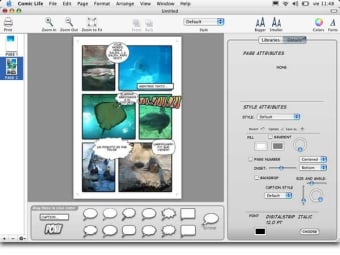
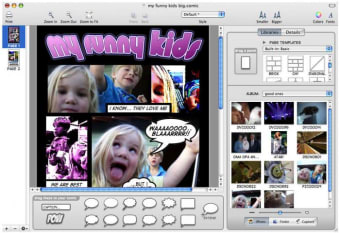
What I enjoyed most from the application is how easy it is to work with. With this type of program, you're looking to play around and Comic Life feels just like that. You can quickly drag and drop your images onto the interface, arrange them in order onto a page, drag bubbles and then enter your text.

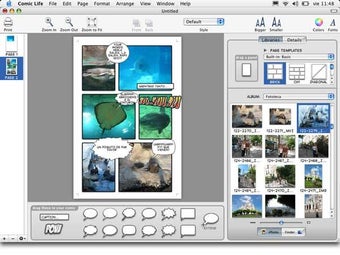
Comic Life offers many shapes, forms and text lettering with styles reminiscent of the best cartoons and comics. All can be extensively customized to your taste from the style attributes tab on the right. I also quite liked the choice of filters, with which you can give a different aspect to your photos, like turning them into a scene from Sin City. If you don't want to get carried away into editing, Comic Life also features loads of page templates and themes that you can start off with.

Importing pictures onto the screen is easy, as you'll only need to drag and drop them from your desktop or pick straight from the preview pane in the application. Even more, you can use your webcam or DV camera to take snaps and post them immediately into your comic strip.

The only little downside to this app is that it sometimes uses up a little too much RAM.

Very intuitive and loaded with features, Comic Life is a great way to have fun with your pictures. It has all the bubbles, styles and fonts you'd expect to make good looking comics. Highly recommended.

Languages:

English

Recent changes in Comic Life:

  • Added brightness, contrast, sharpness, exposure and saturation controls to Image Attributes
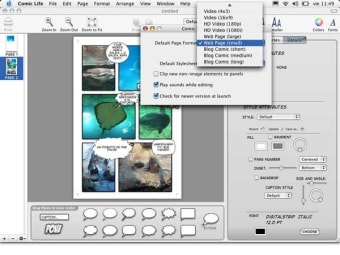
  • Ability to save custom page sizes in 'Preferences'
  • Images can now be seen at actual size/1:1 (CMD-0)
  • iPhoto '08 Events are now accessible via the iPhoto library dropdown menu
  • Improved image export quality
  • New Jagged tail option for balloons
  • Balloons now have the ability to be rotated
  • Captions now snap to panel corners when moved in proximity
  • Page size preferences can now be sized with standard measurements (mm, cm, inches)
  • Pressing 'Shift' constrains an object's dimensions when resizing
  • The font text size toolbar icons now resizes Lettering
  • The last settings in the Export dialog are now remembered (save directory, image quality, image type)
  • Pressing 'Shift' and clicking on another object adds to a multiple selection
  • More page sizes added to default 'Page Size' menu
  • Page Size menu has been revamped
  • Added 'Export as Fixed Resolution PDF' to the Export menu
  • Improved the quality of vector images displayed for PDF objects
  • iPhoto export now has more options (DPI and file format)
  • After copying, pastes are now offset
  • Now able to duplicate objects (CMD-D)
  • Each bubble in the tail of a thought balloon is now drawn progressively smaller
  • Now easier to see which tail is selected when a balloon has multiple tails
  • Optional integrated mailing list signup function

Limitations:

30 day Trial Period

OS requirements for Comic Life:

  • OS: Mac OS X

Minimum requirements:

  • Mac OS X 10.3 or later
Pros
  • Easy editing
  • Webcam capture
  • Comic lettering and bubbles
  • Great fun to use
Cons
  • Can use a lot of RAM
Did you like this review?
20 of 31 users liked it (65%)

Comic Life Softonic Rating: 9Featured program

Softonic gives special recognition to software of exceptionally high quality. More information

From the publisher of Comic Life

Comic Life gives you a super-quick and easy way to create astounding comics, beautiful picture albums and enticing instruction booklets to name a few of the many possibilities. Included are professional and fun templates, ready to drag and drop onto your page for instant attractive photo layouts. Or if you like to be in control, position your photos and panels how you like and save them for later use.

Your iPhoto library and hard drive files are always at your fingertip - just drag in your pictures. Drag on some captions, 'sound effect' text (‘ka-blam!') and speech bubbles and your work is done!

Share your creations with friends and family! Comic Life supports .Mac, html, QuickTime and JPEG exports, so you can share on your website, blog or via email. Comic Life's .Mac support includes RSS feeds, allowing anyone to subscribe to your Comic Life creations - your unwavering fans can get the latest issue 'hot off the press!'. You can even transfer images back and forth online with iPhoto sharing!

Comic Life options

Comic Life Options

Reviews for Comic Life in other languages

Comic Life in other platforms

Softonic Rating:Excellent
10/10

User Rating

6 ratings
Usability
  • Currently 10/10.
Stability
  • Currently 10/10.
Installation
  • Currently 10/10.
Functionality
  • Currently 10/10.
Appearance
  • Currently 10/10.

Download stats

Related

Related searches

Are you the developer of Comic Life?

If your program has received a Softonic rating, feel free to use the following award badge on your site or as part of any other promotional feature you may be putting together.

Comic Life Softonic Rating

Click on the above text field to copy the necessary HTML to your clipboard and then paste it to your website. It will display your program's Softonic Rating and will link to your program page.

Any queries? Contact us if you want more info.

Close